Details
Let’s Be Honest: We All Needed a Win This Week
It was one of those mornings. I walked into class with my coffee in one hand, my sanity barely hanging on in the other, and realized I needed a review activity that didn’t involve me talking at glazed-over teenagers for 45 minutes.
We were in the middle of our Medical Imaging unit using Paxton Patterson — which, if you know, you know. Great content, but after four days of terminology, abbreviations, and digital modules, my kids needed human interaction… and, honestly, so did I.
So, I decided to go old school. Like, pre-Chromebook old school. I wanted something with paper, expo markers, and maybe a little competitive chaos.
Enter: Connect 4.
The “Aha!” Moment
I’d seen someone online mention using Connect 4 as a review game, and I thought, “Perfect — I can make that work.” But I also thought, “I am not writing 50 review questions on a Sunday night.”
So, like any reasonable teacher, I let AI do the heavy lifting.
“Create 50 review questions — 40 challenging, 10 difficult — for 11th grade students to play a Connect 4 review game about medical imaging. Include answer keys, printable game cards, and game rules.”
I attached the PDF of my Paxton Patterson worksheets and answer keys so it would actually pull from our content (not random Internet nonsense about MRI magnets and X-ray superheroes).
Within minutes, I had:
50 questions,
a numbered answer key,
game directions,
and printable game cards (that I didn’t end up liking, but that’s not the point).
Supplies: We Don’t Have Time for Fancy
Here’s what you’ll need to recreate this moment of classroom brilliance:
- 2 Expo markers in different colors (bonus points if they actually have ink)
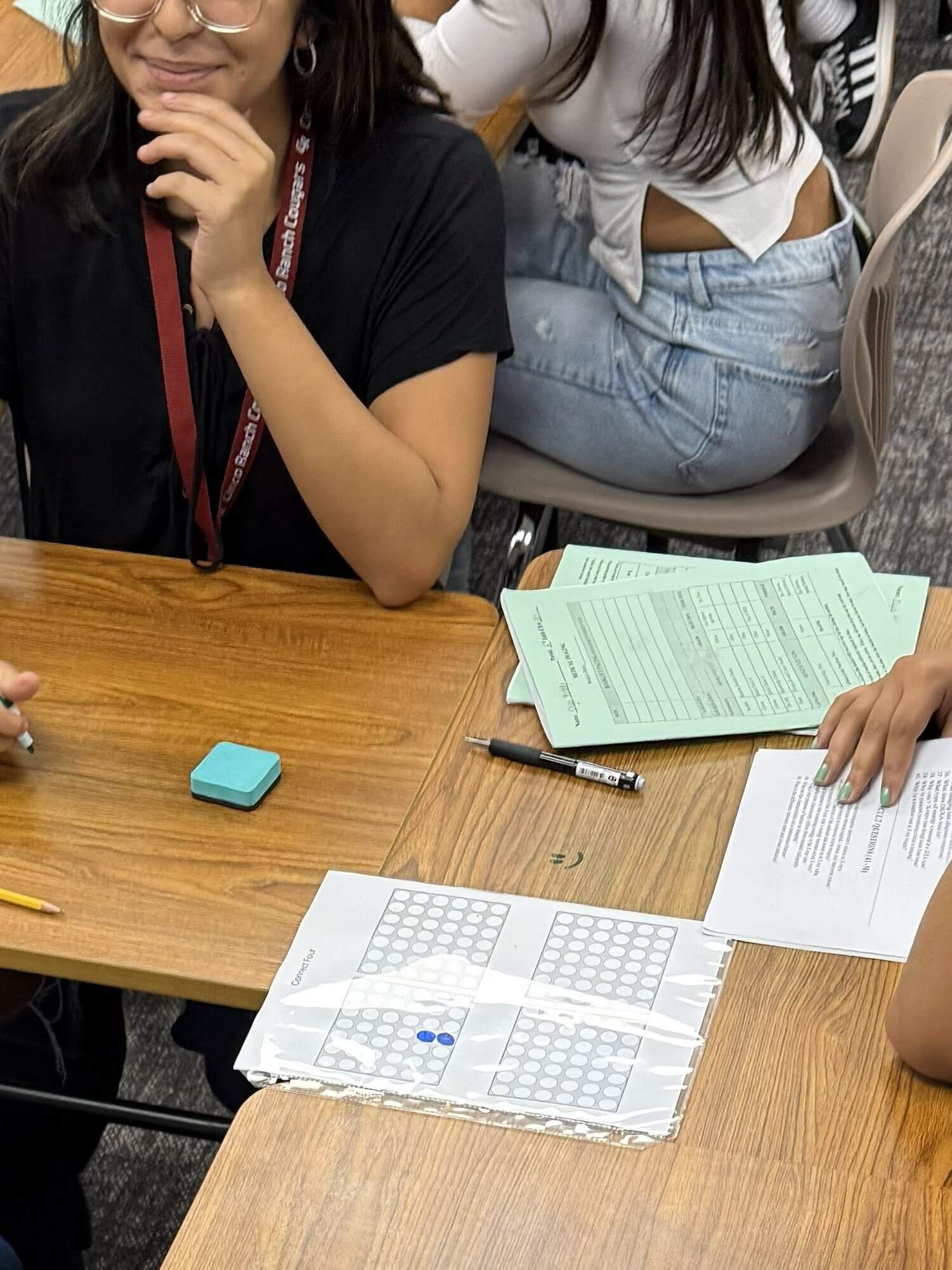
- 1 game board (I just printed one off the Internet and stuck it in a page protector)
- 1 student to play referee and hold the answer key
- 1 picker wheel website
- And lots of Lysol wipes — because, teenagers.
Pro tip: If you’re missing erasers, use those random single socks floating around your laundry room. You know the ones. They’ve been waiting for this moment.
How It Worked and How It Got Better with Each Class
I divided the class into groups of three — two players and one judge. I’d spin the Picker Wheel, call out the question, and whoever answered correctly got to mark their color on the Connect 4 board.
Simple, right?
Well, first period — my forever guinea pigs — immediately found loopholes. They were whispering answers to each other, “helping” their friends, and generally turning my well-intentioned review game into a group think tank of creative cheating.
By second period, I’d fixed it. Students had to write their answers on their desks with Expo markers instead of blurting them out. Suddenly, it got quiet. Eerily quiet. They were thinking. Spelling. Competing. It was glorious.
The Surprise Walkthrough That Actually Went Well
Halfway through my victory lap of teaching genius, I got a surprise learning walk from my principal. Normally, that means instant panic — but this time? The students were engaged, competing, and learning.
Even better, not everyone was playing. I only let the kids who had completed all four days of work join in. The others? Finishing their packets like their lives depended on it. Because nothing motivates like FOMO and marker-based glory.
Lessons Learned: Things I Should Have Explained Sooner
- Some students don’t know how to play Connect 4.
Apparently, the concept of “starting from the bottom row” and “playing both offense and defense” was brand new to them. So, add a mini tutorial unless you want chaos. - Always ask AI for the answer key.
Trust me, you do not want to cross-check 50 questions manually. - Post review materials after they have played the game, usually end of the day.
My overachievers will 100% Google the answers before class just to flex.
Bonus Tip: Tic-Tac-Toe for the Time-Crunched
If you want a shorter version, use the same idea but swap the board for tic-tac-toe. Same competitive energy, fewer tears.
Why It’s Worth Trying
The Connect 4 Review Game was:
✔️ Easy to prep
✔️ AI-assisted (aka teacher sanity-saving)
✔️ Hands-on
✔️ Low-tech but high engagement
And, most importantly, it was fun — for them and for me.
If you want to try it, I’ve linked the prompt, directions, and printable templates over on my website: The CTE Preceptor.
Because at the end of the day, teaching is just creative problem-solving… with Expo markers, socks, and a little help from AI. You can view the YouTube video to see more about the activity.